What to do if you find spyware on your phone
A warning or unfamiliar app can feel alarming. You do not have to make every decision right away. First consider whether taking action on the phone could affect your safety.
Open the app’s safety steps How to assess a finding
SpywareMonitor is in testing now and comes to Google Play in mid-November 2026.
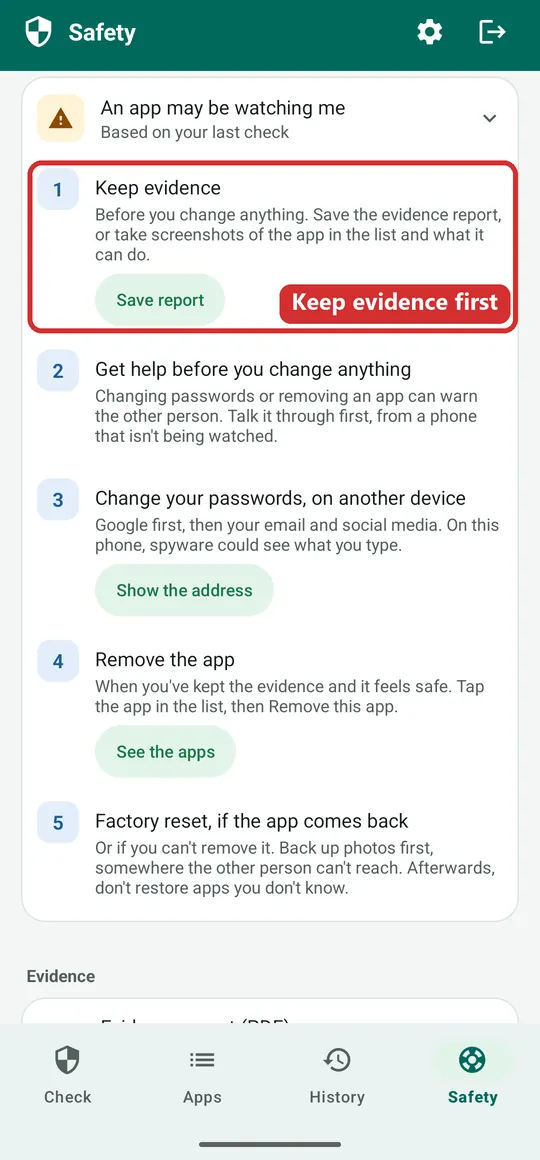
Do not rush to remove an app if someone may be monitoring you. Removing it or changing access can sometimes alert the person who installed it. A support service can help you weigh safer options for your situation.
Start with your immediate safety
If you believe another person can see your phone activity, use a different trusted device to contact someone you trust or a local support service, if that is safer. Avoid using a monitored device to search for help when that could increase risk.
If you are in immediate danger, contact your local emergency number. This guide is general information and cannot assess your personal circumstances.
A measured sequence to consider
- Pause and make a safety plan. Think about what the other person might notice if you remove an app, change passwords or disable location access. Choose steps with support if possible.
- Preserve information, if safe. Record the app name, what access it has and when you noticed it. A report, screenshot or photograph taken with another device may help. Store it where the other person cannot access it.
- Speak with a trusted support person. A specialist service can help you plan around device monitoring, account access and your immediate needs. Use a device you believe is safer.
- Review account access from a safer device. If relevant, check shared location, linked devices and account sessions. Changing access may send alerts or reveal that something has changed.
- Decide together what to change. Removing an app, resetting a phone or changing passwords may be appropriate in some cases, but consider the likely consequences first.
Evidence is optional; safety comes first. Do not put yourself at risk to collect screenshots or keep a phone unchanged.
Why immediate removal may not be the safest first step
Some monitoring tools can notify the person who set them up if access changes or the app disappears. That might lead to confrontation, loss of access to the phone or deletion of other evidence. The possibility depends on the specific app and situation, so seek tailored support when you can.
A scan result is also not always a confirmed diagnosis. Some legitimate apps use powerful permissions. Read why an app was flagged and who published it before deciding what it means.
Where to get help
Contact a local domestic-abuse or technology-safety organisation, law enforcement, or someone you trust. In Norway, call Vold- og overgrepslinjen on 116 006. In the Netherlands, call Veilig Thuis on 0800-2000. Check the current availability and suitability of services in your location.
SpywareMonitor’s “Something was found” guide and help and support section provide steps and additional contact information.
Frequently asked questions
Should I turn off my phone?
There is no single answer for every situation. Turning a phone off may affect communication or alert another person when it comes back online. If you are concerned, ask a specialist support service to help you consider the safest option.
Should I factory-reset my Android phone?
A reset can remove data and may not address monitoring through shared accounts or other devices. Consider preserving information and getting tailored advice before resetting.
Should I change my passwords now?
If you do, use a device you believe is safe. Password changes can trigger notifications or sign-outs. Consider who may have access to recovery email, phone numbers or shared accounts.
More guides
- How to check an Android phone for spyware — what to look at, and what a scan can and cannot prove.
- How to find hidden apps on Android — the full app list, apps without an icon and special access.
- Can someone track your phone without spyware? — accounts, location sharing, linked devices and trackers.
- SpywareMonitor help — how the app works, step by step.
General information only; it is not legal, clinical or emergency advice. Service details can change.