How to find hidden apps on Android
An app may not appear on the home screen, and an unfamiliar name can be hard to interpret. Review the full installed-app list and its permissions, then consider the context before taking action.
See how the app check works Full spyware check guide
SpywareMonitor is in testing now and comes to Google Play in mid-November 2026.
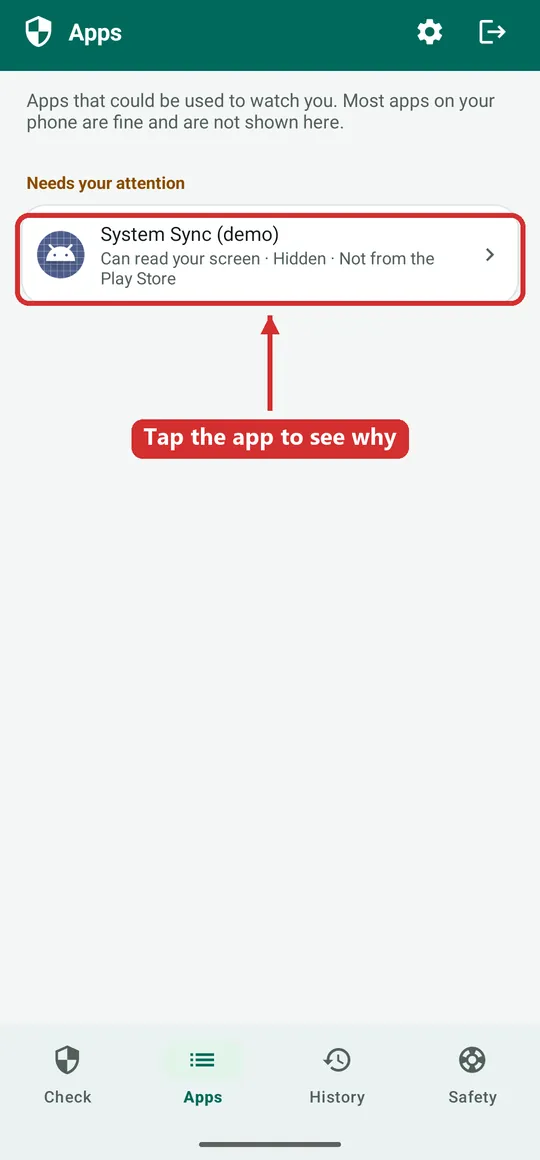
Hidden does not automatically mean harmful. Some system and accessibility apps have technical names or no launcher icon by design. Confirm the app’s publisher and purpose before deciding whether it is suspicious.
What “hidden app” can mean
People may use “hidden app” to describe an app whose icon is not shown in the app drawer, an app with a confusing system-like name, or an app that runs in the background. Android system components and legitimate services can match some of these descriptions too.
Focus on what the app can access, who published it, why it is on the phone and whether its permissions make sense for its stated purpose.
Where to review apps on Android
- Open Android Settings and find Apps. Choose the option that shows all installed apps. The wording and location vary by Android version and phone manufacturer.
- Look for unfamiliar entries. Check the name, app details, publisher and install source when available. Do not rely on the icon alone.
- Review special access and permissions. Look at Accessibility, Notification access, Device admin apps, Location and permission manager. Check whether an app has access that is unusual for its purpose.
- Check for managed or work profiles. Apps installed in a separate profile may not appear in the personal profile’s app list. A work-managed phone may also be governed by an organisation.
- Use a second opinion if uncertain. Ask a trusted technical support person or safety organisation to help interpret what you find.
Look at access
Accessibility or notification access can be powerful. It can also be needed for legitimate assistive or device features.
Check install source
An app installed from outside an app store may deserve closer review, but this alone does not prove malicious intent.
How SpywareMonitor checks for hidden apps
SpywareMonitor checks for apps without an app-drawer icon, apps with known stalkerware names or signing certificates, and apps with access that could be misused. It also reviews selected phone settings. The check runs on the phone, and the app has no internet permission.
Potentially misusable access is explained as a reason to look more closely; the app does not claim that every flagged app is spying. Read the details in how to read the Check screen and what to do when an app is found.
Before disabling or removing an app
If you are concerned that another person may have installed the app to monitor you, consider your safety before changing anything. Removal or permission changes could alert them. If safe, note the app name and its access. Get support from a device you believe is not monitored before making changes.
Frequently asked questions
Can Android apps hide their icon?
Some apps can be configured not to show a launcher icon, and some system components do not have one. The absence of an icon is a clue to inspect the app, not proof that it is spyware.
Can I see all installed apps in Android settings?
Settings usually provides a full app list for the current profile, but menu labels vary. Work profiles, managed devices and rooted phones can change what is visible to a normal app.
Should I force-stop or disable a hidden app?
Not before considering safety and the app’s role. Disabling or removing it can cause problems or alert a person who installed it. Seek advice if you may be at risk.
More guides
- How to check an Android phone for spyware — what to look at, and what a scan can and cannot prove.
- What to do if you find spyware on your phone — safety first, evidence, and getting help.
- Can someone track your phone without spyware? — accounts, location sharing, linked devices and trackers.
- SpywareMonitor help — how the app works, step by step.
Android menus and features vary by device and version. General information only.